Free Chrome extension for YouTube

Subscribe to YouTube channels without leaving the page.

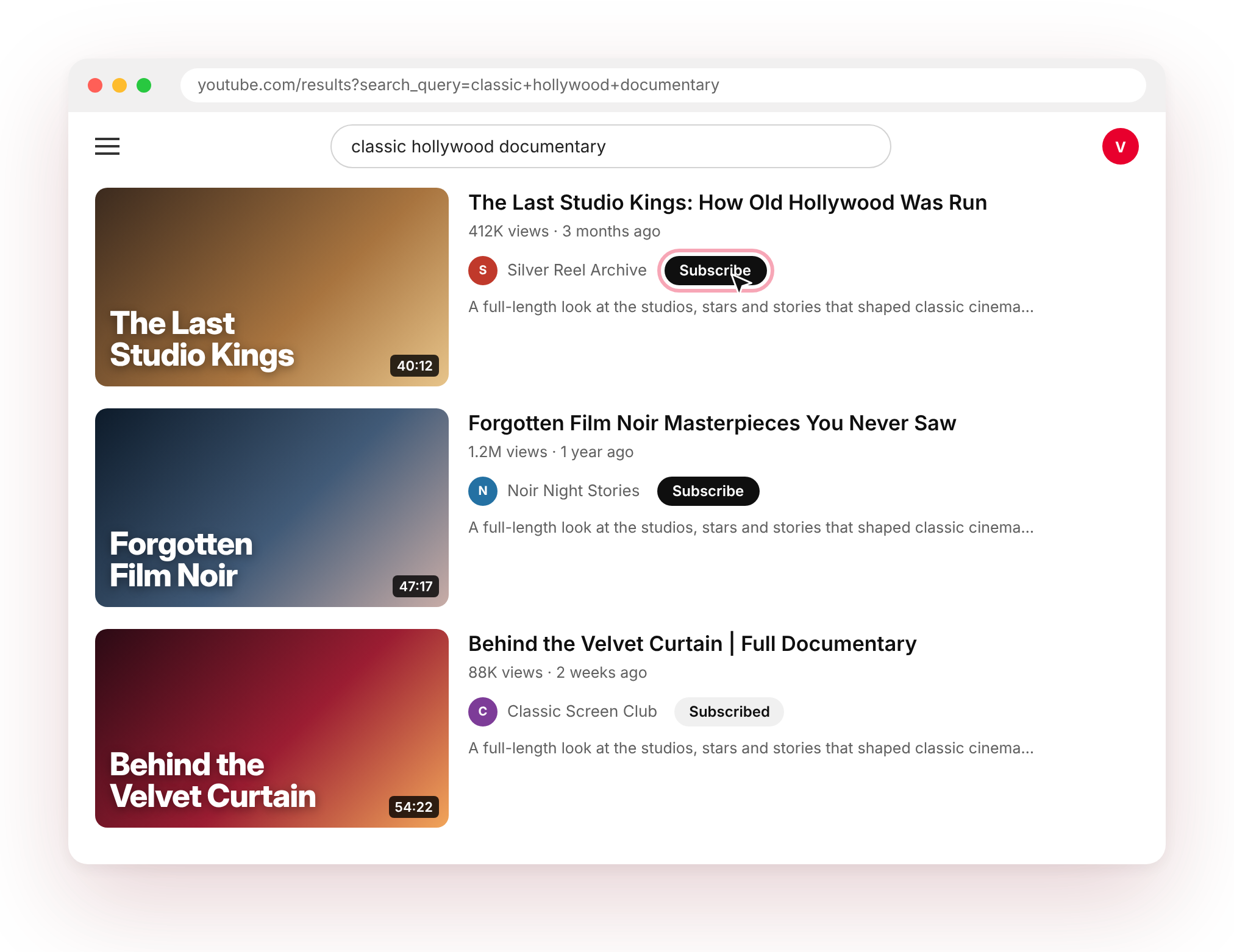
Easy Subscribe adds a Subscribe button next to every channel in your YouTube search results, and a quick SUB button on your Home feed. One click, done.

Free foreverNo sign-upUses your existing YouTube loginNo data collected
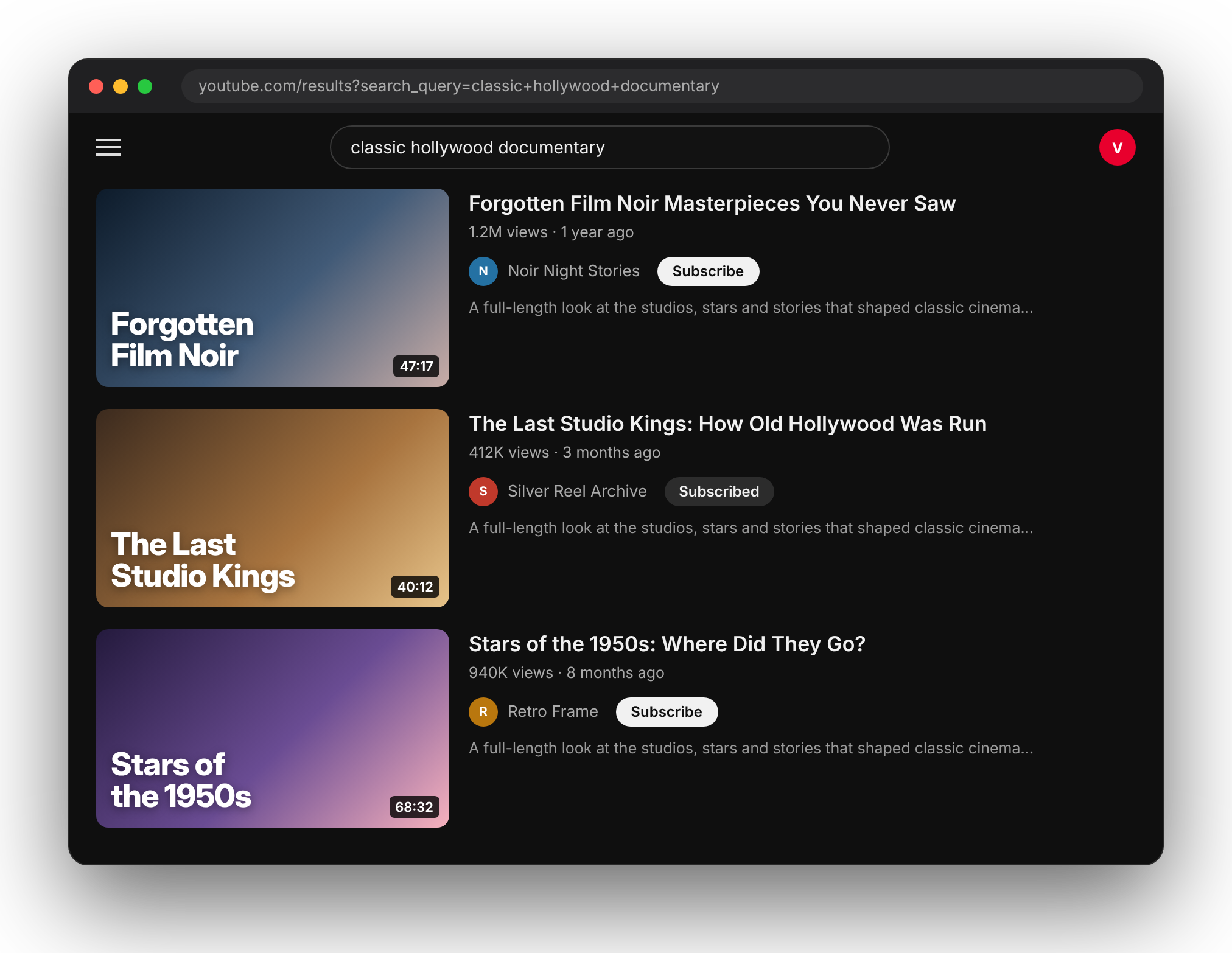
Easy Subscribe buttons shown beside YouTube search results

Subscribe from search

A button beside every channel name.

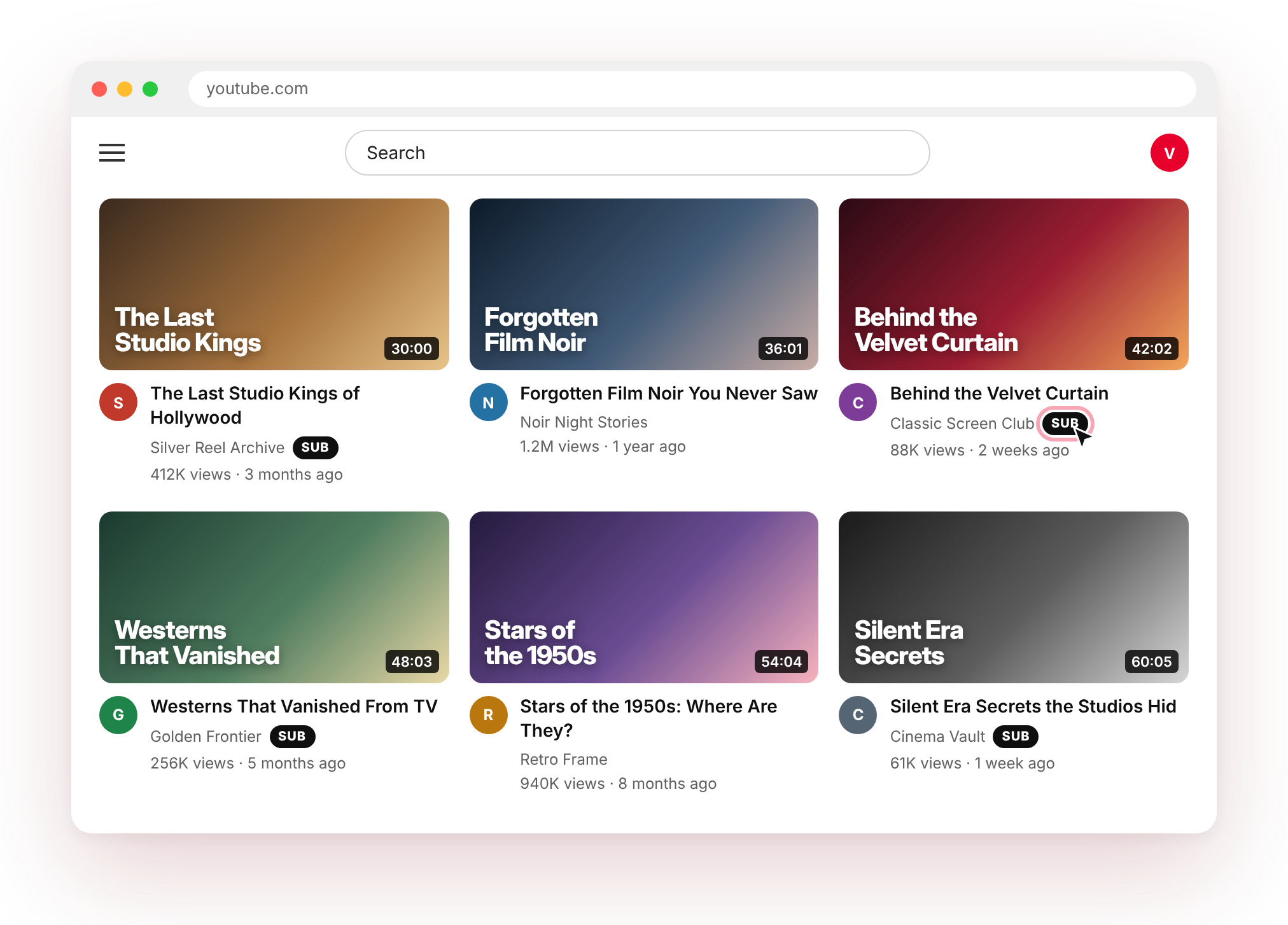
SUB on your Home feed

Only for channels you don't follow yet.

Knows who you follow

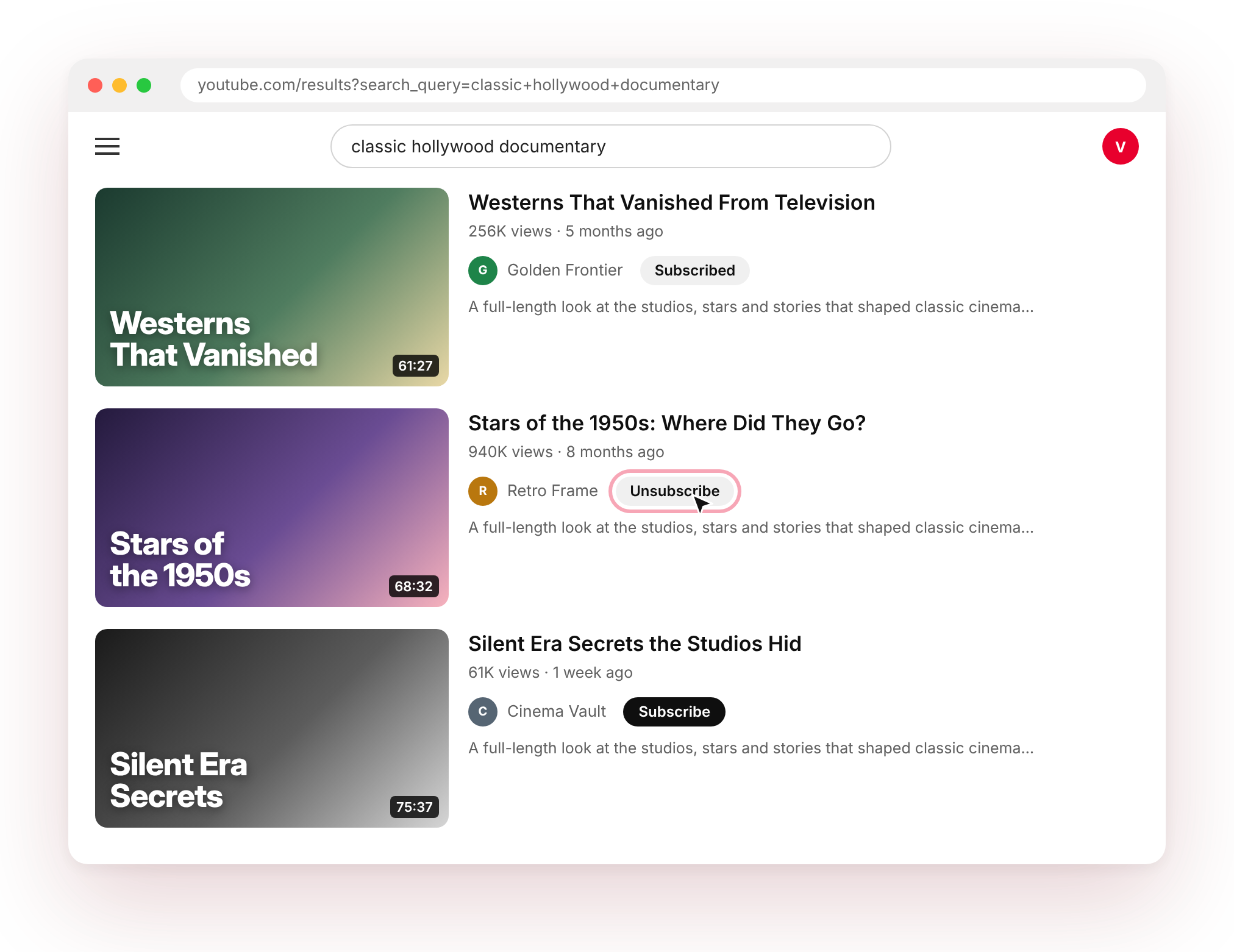
Shows Subscribed so you never double-check.

Private by design

Talks only to youtube.com. Collects nothing.

Everything in one click

A faster way to follow what you find.

Easy Subscribe keeps the useful parts close and the distracting parts out of the way.

YouTube search results showing Subscribed and Unsubscribe states

Search results

Subscribe right from search.

See a channel you like in search? Subscribe on the spot instead of opening each channel in a new tab. Channels you already follow show “Subscribed”, and hovering lets you unsubscribe after a quick confirmation.

  • Works on every search result
  • Subscribed status shown automatically
  • Confirmation before unsubscribing
YouTube Home feed with compact SUB buttons

Home feed

One tap SUB on your Home feed.

A compact SUB button appears beside channels you don't follow yet. Channels you already follow stay clean, with no button at all.

  • Only shows when it’s useful
  • Small and out of the way
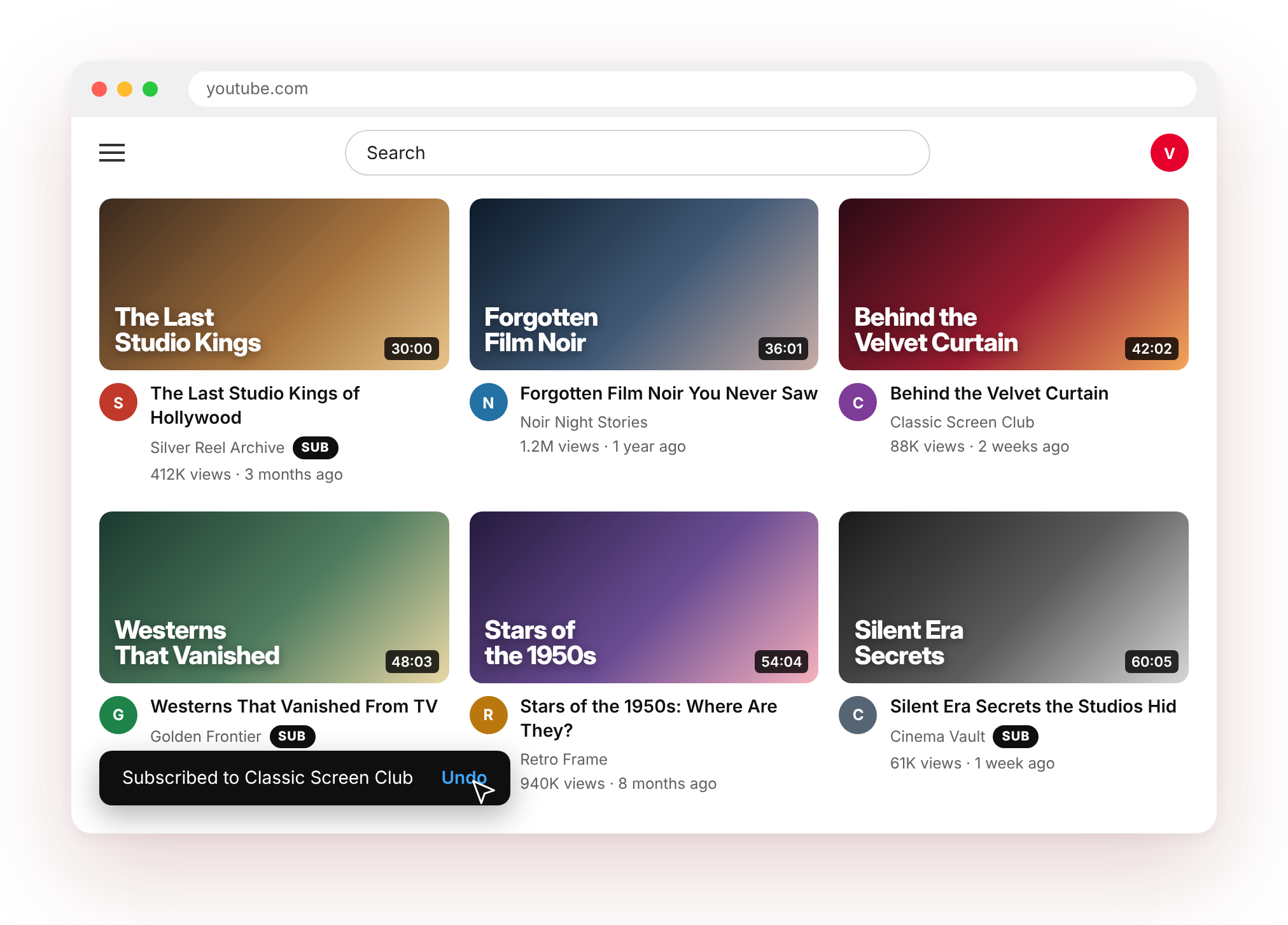
Subscription confirmation with an Undo button

Safety net

Clicked by mistake? Undo.

Every Home-feed subscribe shows a short confirmation with an Undo button, so a stray click is never a problem.

  • Instant confirmation
  • One-click undo
Easy Subscribe working in YouTube dark theme

Looks native

Feels like part of YouTube, in light and dark.

Buttons match YouTube's own style and follow your light or dark theme automatically.

  • Light and dark theme support
  • No clutter, no pop-ups

How it works

Three steps. Then it just works.

1

Add Easy Subscribe to Chrome

Install it free from the Chrome Web Store in one click.

2

Open YouTube while signed in

Search for anything or open your Home feed. It uses the login you already have.

3

Click Subscribe or SUB

Subscribe instantly without leaving the page. Undo any time.

Privacy first

Private by design.

The extension does one thing: help you subscribe on YouTube. Nothing more.

Only talks to youtube.com

Subscribe requests go straight from your browser to YouTube. Nothing passes through our servers.

Collects nothing

No analytics, no tracking, no ads, no data sold or shared.

No extra permissions

It doesn't ask to read your browsing on other sites.

No password needed

It uses the YouTube session you’re already signed in to. We never see your login.

Read the full privacy policy

Made for your workflow

Who it's for.

Viewers

Follow channels you discover in search in one click.

Creators & researchers

Quickly follow competitor and inspiration channels while researching a niche.

Binge explorers

Build your subscriptions while browsing the Home feed.

Questions, answered

FAQ.

Is Easy Subscribe free?

Yes. It's completely free with no ads or paid tiers.

Do I need to give it my YouTube password?

No. It uses the YouTube login already in your browser. It never asks for or sees your password.

Which channel will I subscribe as?

Whichever channel or Brand Account you're currently using on YouTube. Switch accounts on YouTube and it follows along.

Why don't some videos have a button?

Videos credited to two channels at once (collaborations) don't get a button, because there isn't one single channel to subscribe to. Buttons also only appear when you're signed in.

Will it show Subscribed for channels I already follow?

Yes. It loads your subscription list and refreshes it regularly, so already-followed channels show “Subscribed” on search and no button on the Home feed.

Which browsers does it work on?

Google Chrome on desktop. It also works in most Chromium-based browsers that support Chrome Web Store extensions, such as Microsoft Edge and Brave.

Does it collect any data?

No. It doesn't collect, store on a server, or share any personal data. See the privacy policy below.

Is it made by YouTube?

No. Easy Subscribe is an independent extension by PakLingo and isn't affiliated with or endorsed by YouTube or Google.

Legal

Privacy Policy

Last updated: [LAST_UPDATED_DATE]

What the extension does

Easy Subscribe adds Subscribe/SUB buttons on youtube.com and subscribes or unsubscribes you when you click them.

Data it uses

It runs only on youtube.com. To make subscribe/unsubscribe requests and read your current subscription list, it uses your existing signed-in YouTube session in your browser. These requests go directly from your browser to YouTube.

Data stored on your device

A cached list of channel IDs you're subscribed to, and a lookup table of channel handles to channel IDs, are saved in your browser's local storage for youtube.com so buttons load quickly. This never leaves your device and is cleared if you clear YouTube's site data.

What we don't do

We don't collect, transmit, sell or share any personal data. No analytics, no tracking, no remote code, no third parties.

Permissions

No extra browser permissions. It only runs on youtube.com pages.

Changes and contact

We'll update this page if anything changes. Contact: [CONTACT_EMAIL]
Easy Subscribe icon

Stop opening channels one by one.

Add Easy Subscribe to Chrome and subscribe from anywhere on YouTube.

Add to Chrome – it's free